What iOS Shares
Background
My iOS App AppendX primarily functions out of your share-sheet. It’s designed to allow you to share anything text-based from any iOS app directly to the markdown files where you collect and organize information. So my first step in coming up with a universal collection funnel for shared data, was figuring out exactly what various apps actually share. Turns out - it’s wild. And frustrating.
What I expected
NSItemProvider is the mechanism Apple constructed so that Apps can share data with each other. The providing app makes data available in different formats and describes them with a Uniform Type Identifier. The receiving app looks at the types available and selects the data it thinks is best for its purpose. Here’s a simplified example:
extensionContext.inputItems → [NSExtensionItem]
  NSExtensionItem
    .attributedTitle               → a title, if the app bothered
    .attributedContentText         → body/preview text, if the app bothered
    .attachments                   → [NSItemProvider]
      NSItemProvider
        .registeredTypeIdentifiers → ["public.url", "public.plain-text", …]
        loadItem(forTypeIdentifier:) → actually fetch one representation
So there are a couple of different places that the same type of data can live - it can be in meta data on NSExtensionItem or it can live in types within NSItemProvider
The receiving app asks what data types are available. The providing app decides what data to populate where. If data is available in the providing app, but the providing app doesn’t expose it - you can’t get to it.
Research
I added a debug view to my app that’s available when running it locally from Xcode to a Simulator or connected device. The debug view is invoked with #if DEBUG (and doesn’t ship to production) and iterates through all available data in the share sheet and dumps it to the screen. Here are a few of the findings from my research.
Finding 1 - Many apps send a URL and nothing else.
I had hoped that I would get the link text or the <title> of the web page as well, but a lot of times all I got was a URL.
Finding 2 - attributedTitle was nil in every app I captured from.
Even when sharing a web page, the <title> tag ends up in attributedContentText instead:
--- RAW: NSExtensionItem metadata ---
item[0]:
  attributedTitle: (nil)
  attributedContentText: Your Favourite Alt Rock/Heavy Metal Albums : r/MusicRecommendations
Finding 3 - Your text selection may not be shared.
If you have text selected when you share a webpage from the browser toolbar, the text you selected is not made available. And if you share from the text selection, the URL is not available. You get one or the other. This is troublesome for me, because I’ve gone to lengths to ensure that my users do not lose data that they think they’re capturing.
Finding 4 - Youtube doesn’t provide a URL field.
If you share a video from youtube, public.url is not populated — but — the url appears in public.plain-text. If you were expecting a url and didn’t dig any deeper - you’re out of luck.
Finding 5 - Apple News shares your selected text, but not where you expected.
If you select text in an article, then share the article, your selected text comes along, but it’s url-encoded in ?highlight= query parameter. That’s the only place.
--- RAW: NSExtensionItem metadata ---
item[0]:
  attributedTitle: (nil)
  attributedContentText: I'm a vet and these are the 10 healthiest dog breeds in the world - BBC Countryfile Magazine

--- RAW: Attachments (2) ---

Attachment 0:
  typeIdentifiers: public.plain-text
  public.plain-text:
    I'm a vet and these are the 10 healthiest dog breeds in the world - BBC Countryfile Magazine

Attachment 1:
  typeIdentifiers: public.url
  public.url:
    https://apple.news/AUMZOtsGRRpeTRNkblJKUGA?highlight=Similar%20in%20nature%20to%20German%20shepherds,%20but%20with%20a%20lot%20less%20genetic-disease%20risk,%20the%20Belgian%20malinois%20is%20a%20great%20choice%20for%20someone%20wanting%20a%20larger%20breed.

--- NORMALIZED: SharedContent after normalized() ---
url: https://apple.news/AUMZOtsGRRpeTRNkblJKUGA
title: I'm a vet and these are the 10 healthiest dog breeds in the world - BBC Countryfile Magazine
text: Similar in nature to German shepherds, but with a lot less genetic-disease risk, the Belgian malinois is a great choice for someone wanting a larger breed.
htmlContent: (nil)
sourceApp: (nil)
That quirk has a side effect. Because News hides the selection in the URL, its public.plain-text attachment is free to carry something else — and what it carries is the article title. Which sets up the one case that broke my nice clean rule.
Finding 6 - Two apps, identical data, opposite meanings.
When Apple News shares an article, the payload looks like this:
attributedTitle: (nil)
attributedContentText: 13 Common Medications You Should Never Mix with Alcohol - Health
Attachment 0: public.plain-text → "13 Common Medications You Should Never Mix with Alcohol - Health"
Attachment 1: public.url → https://apple.news/AaFhv-GBVQIi-3Mr730AbfQ
When the Wikipedia app shares text you selected, the payload looks like this:
attributedTitle: (nil)
attributedContentText: Bear Swamp uses reversible water turbines of the Francis type.
Attachment 0: public.plain-text → "Bear Swamp uses reversible water turbines of the Francis type."
Attachment 1: public.url → https://en.wikipedia.org/wiki/Bear_Swamp_Hydroelectric_Power_Station
Same shape. Nil title, populated content text, one plain-text attachment carrying the same string, one URL. Structurally there is no difference between them.
But for News that string is the article title. For Wikipedia it’s what the user highlighted. If you put both in the same slot you’re wrong half the time — either you file a headline as if the reader chose it, or you throw away the sentence they actually cared about.
I looked for a signal that would separate them. There isn’t one in the data. The only thing that distinguishes these two payloads is the host.
Finding 7 - Maps plays by the rules, and I still got it wrong.
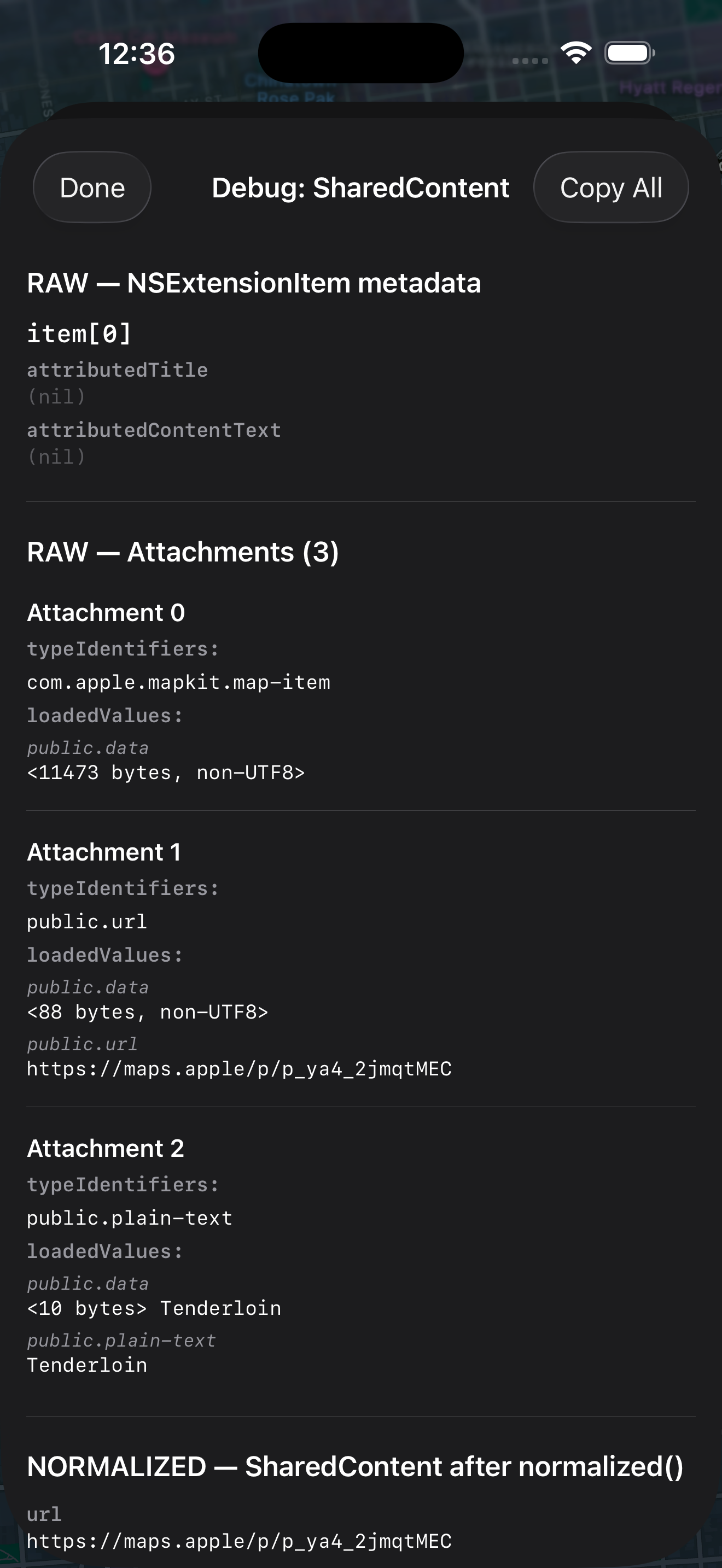
Sharing a location gives you three attachments: an 11KB com.apple.mapkit.map-item blob, a maps.apple URL that tells you nothing, and a public.plain-text attachment containing the place name. Which is correct! That’s where a place name should be.
I lost it anyway. loadItem(forTypeIdentifier: "public.plain-text") handed me Data, not String, so my item as? String returned nil and the branch silently bailed. Every capture from Maps came out as a bare unreadable URL until I noticed.
That one’s on me. The completion handler gives you an NSSecureCoding object and the concrete class is allowed to vary — I’d assumed a type the contract never promised. If you take one implementation note from this whole post: decode both String and Data.
Finding 8 - Safari sends multiple URLs and you probably don’t want one of them.
Safari sends two public.url attachments, the canonical URL and an AMP/tracking variant (?hs_amp=true parameter). You can’t rely on the position of either - you must inspect the contents and decide which URL you want.
Finding 9 - Kindle app is the MVP.
When you share a text quote from a book in the Kindle app, the Kindle app is pre-formatting it to be shared as an image or text. So, for text - you get a quoted piece of text, an em-dash with the book title, the author name(s), and an a.co URL.
Finding 10 - But Amazon finds a way to sell products.
In some shares from the Amazon shopping app, they add on a generated string of marketing copy. Of course. “These extra-strength cleaning tablets quickly remove odors and stains from aligners, retainers, dentures, and night guards in just 3 minutes. You don’t want to miss it!”
Finding 11 - Nobody sends HTML. Nobody.
I didn’t find any app across everything I tested where public.html was available. All the apps flatten rich text to plain before handing them off. Which is frustrating, because NSItemProvider is the same abstraction that provides sharing, drag and drop, and the clipboard!
Finding 12 - The Clipboard has your rich text.
Bold, Italics, Hyperlinks, all ready to go. When you copy text, UIPasteboard provides public.html as well as public.plain-text
After discovering that no app gives you rich text through sharing, this inspired the text input view in AppendX. Launch the app, tap input, tap your target - you get a text field where you can append directly to your markdown file - with a ‘paste as markdown’ button. It’s an extra tap or two - but you end up with formatted markdown instead of plain text from the share-sheet.
What I got wrong
One of the original pillars of my writing this post was a finding that the share-sheet was promoting a hostname as the title when the title was absent. But I didn’t realize that my own normalization code was doing that, as I discovered when verifying my claims for this article. I changed my debug structure so that it dumped both the RAW data and the NORMALIZED data so I could see exactly what was available and how I was consuming/transforming it. Turns out that hostname promotion was wrong, it exposed a few more bugs in my normalization code, and it changed how I approached normalizing the data for the better.
The Takeaway
You can’t build this around knowing which app the share came from. There are too many apps, they change, and half the time the payload doesn’t tell you anyway. So the rules have to work on the shape of the data: what fields are present, what types are registered, what’s actually in them.
That gets you most of the way. But “most” isn’t “all” — sometimes two apps hand you the same shape and mean different things, and then you have no choice but to look at the host. I’ve got exactly one of those, and I’d rather have one honest exception than a rule that quietly saves the wrong thing.
So: shape first. Host only when shape can’t tell you.
Some simple rules that I created from this research:
Reading the data at all
loadItem(forTypeIdentifier:)hands you anNSSecureCodingobject — the concrete class can vary. TryString, then fall back to decodingDataas UTF-8. Only tryingStringsilently drops content that’s right there.- Read every attachment, not just the first one that looks useful. Maps puts the place name in the third.
- Print nil fields explicitly when you’re debugging. Absence is a finding, and omitting empty fields is how I spent a week thinking apps were sending hostnames.
Which field means what?
- No plain-text attachment →
attributedContentTextis a title - Plain-text attachment present → it’s the user’s selection; don’t turn it into a title
- Except Apple News — there the
plain-textis always the article title, and the selection is in thehighlightparam - Never invent a title from the URL’s hostname
Cleaning up the values
- If
textis a URL andurlis empty, promote it - Decode the Apple News
highlightparam into thetext file://is device-local — take the filename, drop the path- Strip
utm_*,fbclid,wprov,hs_amp,is,solution,token; prefer non-AMP - Trim whitespace
The Lesson
The API is designed in a way that is extensible and useful. This is a good design - but it leaves it up to individual apps to decide how (or if) to use it. Most development teams, if they have a ‘share’ use case that they test for, it’s probably something simple like ‘send to Messages’ and they don’t consider any other receiver that could use richer data. The API is designed to handle it, without overloading more simple destinations — it’s just up to the providing Apps to make the data available. Even inside of Apple, this isn’t consistent across functions.
This is why, for AppendX, I had to create a normalization layer between the raw share data and what I actually want. It’s why I can capture things like selected text from News, but I had to go looking for it.
And The Future
I hope to get feedback from my users that helps me fix bugs and address edge cases. My app has already become an essential tool in my discovery/capture chain and I know it will be valuable to others as well.
If you’d like to see all the raw debug data that was captured, I posted a gist of my debug dumps with descriptions of the originating app and parameters.