Job Search Robot
(Note: since writing this, I’ve rebuilt my job search bot to be more robust and less error-prone. you can read about the new one here: Job Search Bot v2 )
The Need
A lot of the training I’ve been doing for work has been about automating processes and using AI for specific purposes where it produces the most value. I learned to create tools that automate tedious and repetitive tasks, and use AI to augment human decisions.
So when I unexpectedly needed to find a new role, I knew much of that laborious workflow could be automated and made less painful with the assistance of clever tools.
The Architecture
Claude.ai and I went back and forth to create a design spec for the system. We ultimately decided to separate the process into ingestion, storage, processing, refinement, and output.
We created a list sources that I would normally search and scan manually. Sites like LinkedIn, BuiltIn, etc. Also, I wanted to identify specific companies “S-tier” that I wanted to pursue working for. Claude (desktop app, Mac) with Chrome integration was used to determine the page structure of each target, and figure out the query structure (e.g. can we take the URL with GET variables after a search, or do we need to submit a form).
Step 1: The Scraper
The scraper itself is a structure of python scripts that take advantage of Playwright, which uses a headless browser to navigate the web. While most often used in QA testing, it provides excellent tools to drill down to specific UI components on a web page. Some manual tweaking was necessary to identify in-page structures so that we could retrieve the relevant data from each site.
The scraper performs a few searches on each site for specific sets of keywords, and also searches on the S-tier companies career pages that I specified.
Step 2: The Database
The listings found are stored in SQLite, with typical role data (company, title, salary, location, etc.). Besides these basics, the schema is extended for fields used in subsequent steps.
Step 3: The Scorer
This is where an ‘a-ha’ moment really came into play. In another project with Claude, I’m documenting all the computers in my house for reference/maintenance purposes. While we were determining the best local model I could run in Ollama on my M4 Mac Mini, I realized I have a powerful Gaming PC sitting here unused all day!
So the PC got Ollama also, and with 64gb of DDR5 RAM (purchased long before the shortage!) and an AMD rx6950xt GPU with 16gb VRAM, it’s running Qwen3.6
which is exposed to the Mac via the local (gigabit ethernet) network.The Scorer script itself (written in Python) runs on the Mac Mini, iterates through the unscored jobs in the database, and farms out the scoring decisions to Qwen on the PC. Besides the data about each role, the model is given an instructive prompt, limitations about salary, location, etc. as well as my resume in its entirety.
You are a job application assistant. Score this job posting from 0-100 based on how well it matches the resume below.
The scores are returned to the scoring script that saves everything in the SQLite database.
Step 4: The Polisher
For the job postings determined by the scorer to be excellent (85 or higher), they’re flagged for an extra ‘polish’ step to be handled by a more powerful model. In this case, I’m using Claude via Claude Platform API. Claude is tasked with researching the company, writing a few bullet points for items that I should mention in a Cover Letter, and optionally elevate the rating if it determines I am an exceptional fit for the position.
All this data is then written back to the SQLite database.
Step 5: The CRM
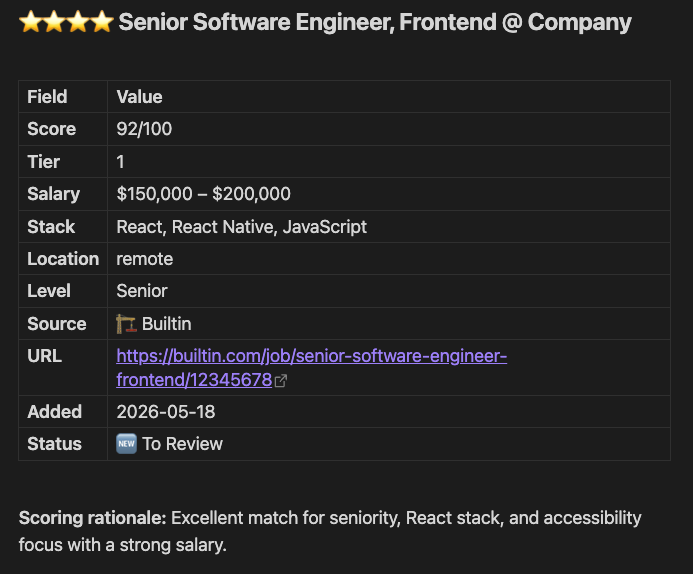
I’m keeping a record of all my applications in markdown files in Obsidian. The last step for the python scripts is to update a ‘Candidates’ file for me to manually review.
Step Final: The Human
Now, it’s up to me to read the summary and click through to each posting and decide whether I’m interested in applying. If a position allows me to include a cover letter, I have a list of items that I should talk about that match my qualifications to the needs expressed in the description.
After I’ve reviewed and either acted upon or skipped a job, I move that entry to an Archive file for reference later if I do get a call back and want to check the notes for that role.
The Problems
This system has been iterated on a few times, through trial and error. The first adjustments were mentioned earlier, if a relevant piece of data was in a different place on a website, we would update the document selector to get better data.
The Pay
One thing Qwen did sometimes was to hallucinate the salary for a role when one could not be found in the posting. We updated the prompt to give more guidance about how to identify the patterns of how salary is depicted on websites, and if none could reliably be determined, to say it wasn’t found.
The Dupes
Sometimes we’d find the same job posted at different URLs, and added de-duping based on company plus title.
The Scammers
In order to protect the system from prompt injection attacks, additional instructions were added to the scoring prompts, and various safeguards applied to the data processing scripts.
The Spammers
There are companies that are making many posts for the same job, or using keywords to get you to view a ‘job’ when realistically it’s not relevant. Also, there are companies I would generally refuse to work for on a moral basis. We extended the architecture to have a block list for companies I don’t want to see (or waste time/energy/resources on).
The Crashes
This is one I’m still working on - even though the Qwen model is 35 billion parameters, the ‘a3b’ means that only 3 billion are ‘active’ at any one time. I thought that would mean no problem using it, but it turns out that from time to time, the machine does run out of memory or has issues with AMD’s drivers that cause a crash. I may ultimately switch to a more simplistic model to avoid these things.
The Takeaway
Does this system find me a job? Not by itself. What it does is remove the parts of job searching that are purely mechanical: the scanning, the filtering, the “is this even worth my time?” triage. That work is now handled before I ever click on a link.
What’s left is the part that actually requires a human: reading between the lines of a job description, deciding whether a company’s mission resonates, crafting a cover letter that sounds like me. The system handles the volume problem so I can focus on the judgment calls.
Building it also reminded me why I got into this work in the first place. The best tools don’t replace what you do, they make your life easier by removing obstacles and hardship, allowing you to care about what matters.
p.s. if you want me to build clever tools to help your company, reach out via email or on my linked socials (links in the header). I’d love to talk.